

Do you know the 6 most powerful MS Word tricks that you can learn in just 5 minutes? Mastering these 6 powerful tricks will elevate your skills to an advanced level. Most people are unaware of these specific MS Word tricks. Once you learn them, you will be able to perform any task in MS Word quickly and easily. Everyone should know about these 6 tricks. If you aren’t familiar with them yet, we will explain them to you today. You can use these tricks in both new and older versions of MS Word.
After reading about these 6 MS Word tricks, be sure to watch the video tutorial. You will find the link to the video tutorial at the end of this post.
Trick (1): Paragraph Selection
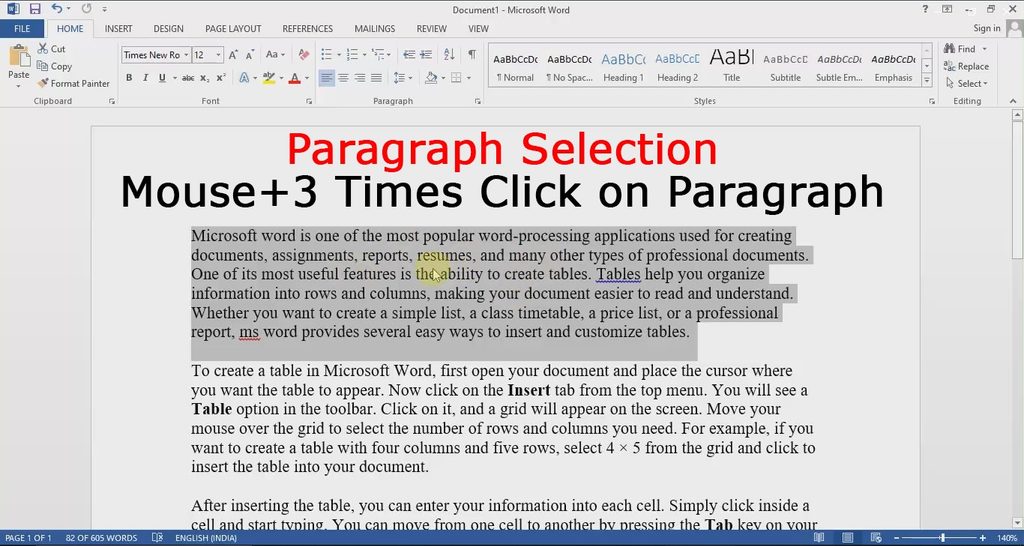
With this trick in MS Word, you can quickly and automatically select any paragraph. Previously, you might have selected a paragraph by dragging the mouse, but now you can do it automatically. To do this, simply place your mouse cursor anywhere within the paragraph and click the left mouse button three times.
Trick (2): Paragraph in Capital Letters or Small Letters
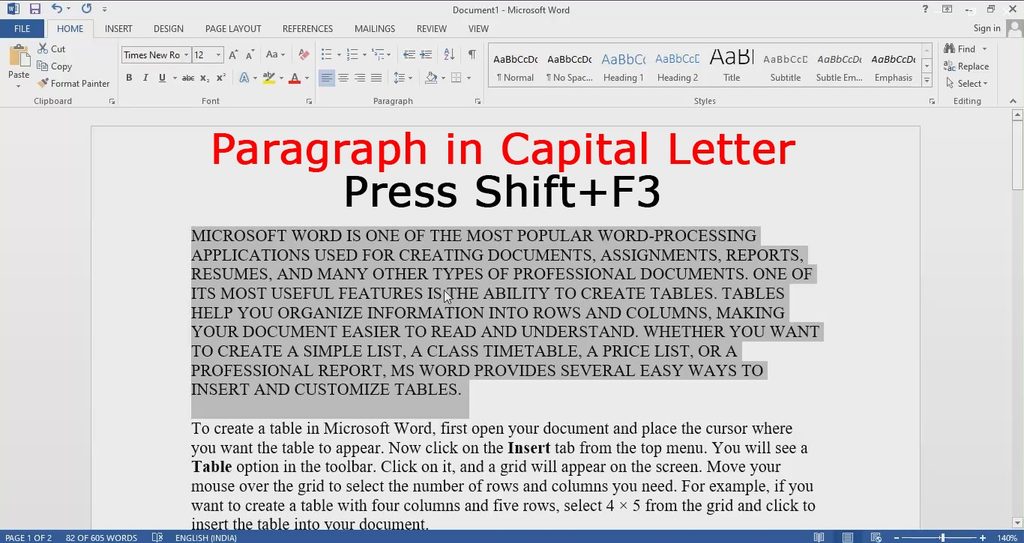
In this Tricks you can make Paragraph in Capital Letter, Small Letter or Running Letter. For this, select the paragraph and press Shift + F3 from the keyboard. Whether you want Capital Letter, Small Letter or Running Letter, press Shift+F3 every time.
Tricks (3): Sentence Selection
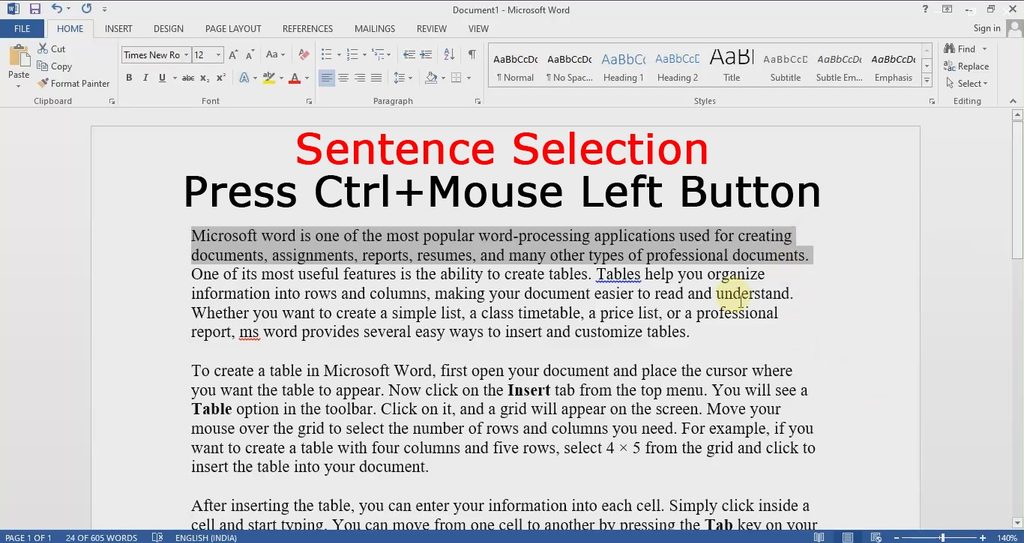
You can select any sentence in MS Word using this trick. Simply place your mouse cursor on the sentence you wish to select, then hold down the Ctrl + key and click the left mouse button.
Tricks (4): Remove Word
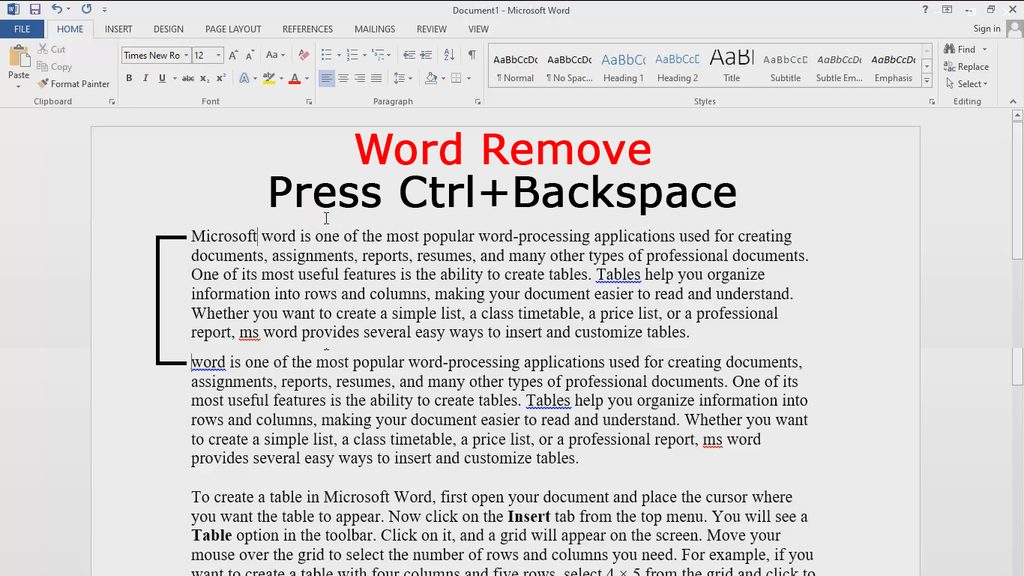
With this trick, you can remove any word in MS Word with a single click. To do this, place your mouse cursor at the end of the word and press Ctrl + Backspace on your keyboard.
Tricks (5): Automatic Lines
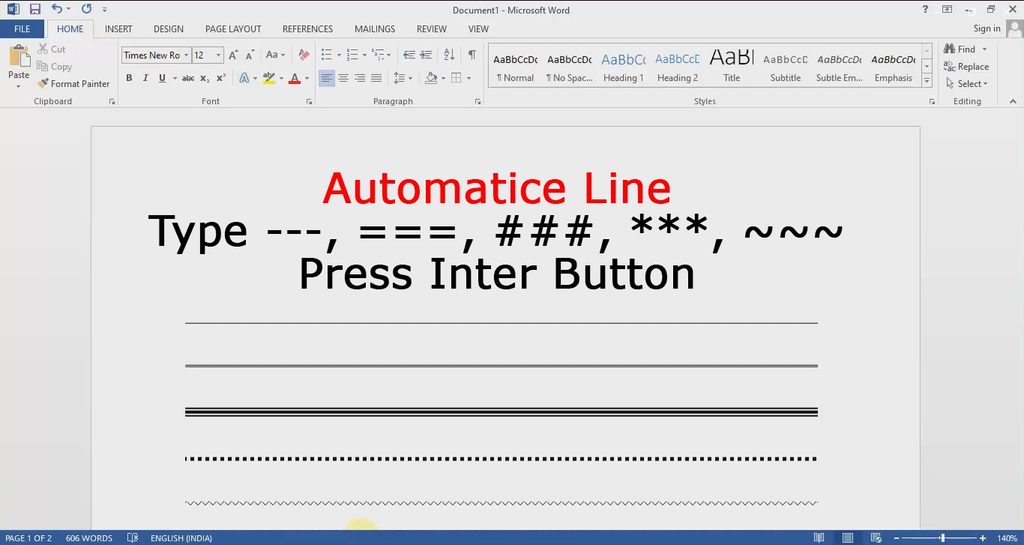
With this MS Word trick, you can automatically insert lines. Simply type `—` (three hyphens), `===` (three equals signs), `###` (three hash symbols using the Shift key), `***` (three asterisks using the Shift key), or `~~~` (three tilde symbols using the Shift key), and then press the Enter key.
Trick (6): Automatic Table
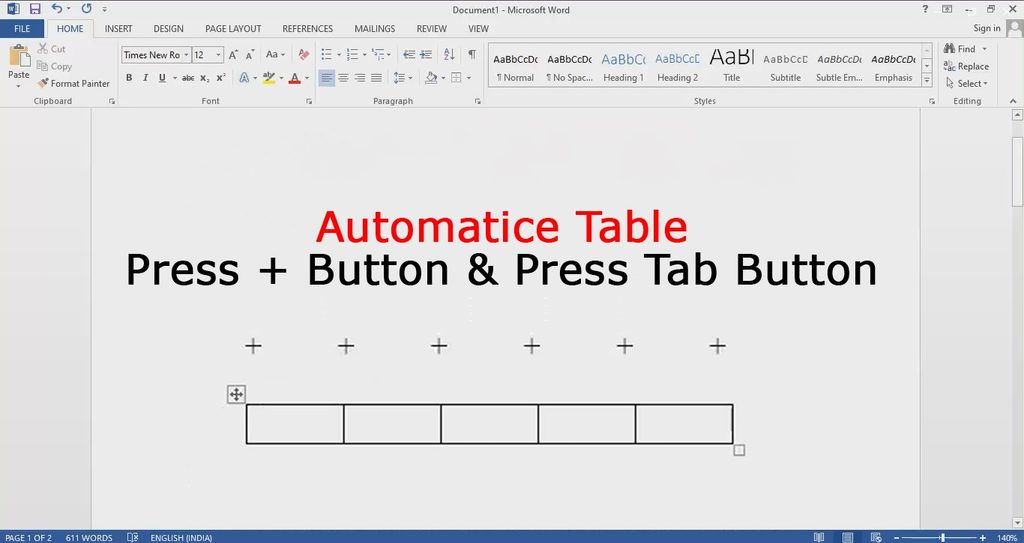
You can use this trick to create an automatic table in MS Word. To create an automatic table, type the plus (+) sign on your keyboard; type it as many times as the number of columns you want. Press the Tab key between each plus sign—that is, type a plus sign and then press the Tab key. Repeat this process for each column, and finally, press the Enter key.
In Hindi:-
क्या आप MS Word की उन 6 सबसे असरदार ट्रिक्स के बारे में जानते हैं जिन्हें आप सिर्फ़ 5 मिनट में सीख सकते हैं? इन 6 ज़बरदस्त ट्रिक्स को सीखने से आपकी स्किल्स एडवांस्ड लेवल पर पहुँच जाएँगी। ज़्यादातर लोग MS Word की इन खास ट्रिक्स के बारे में नहीं जानते। एक बार जब आप इन्हें सीख लेंगे, तो आप MS Word में कोई भी काम तेज़ी और आसानी से कर पाएँगे। हर किसी को इन 6 ट्रिक्स के बारे में पता होना चाहिए। अगर आप अभी तक इनके बारे में नहीं जानते हैं, तो आज हम आपको इनके बारे में बताएँगे। आप इन ट्रिक्स का इस्तेमाल MS Word के नए और पुराने दोनों वर्शन में कर सकते हैं।
इन 6 MS Word ट्रिक्स के बारे में पढ़ने के बाद, वीडियो ट्यूटोरियल ज़रूर देखें। आपको इस पोस्ट के आखिर में वीडियो ट्यूटोरियल का लिंक मिल जाएगा।
ट्रिक (1): पैराग्राफ चुनना (Paragraph Selection)
MS Word में इस ट्रिक से आप किसी भी पैराग्राफ को तेज़ी से और अपने-आप चुन सकते हैं। पहले, हो सकता है कि आप माउस को ड्रैग करके पैराग्राफ चुनते हों, लेकिन अब आप इसे अपने-आप कर सकते हैं। ऐसा करने के लिए, बस अपने माउस कर्सर को पैराग्राफ के अंदर कहीं भी रखें और माउस का बायाँ बटन तीन बार दबाएँ।
ट्रिक (2): पैराग्राफ को कैपिटल या स्मॉल लेटर्स में बदलना (Paragraph in Capital Letters or Small Letters)
इस ट्रिक से आप पैराग्राफ को कैपिटल लेटर्स, स्मॉल लेटर्स या रनिंग लेटर्स में बदल सकते हैं। इसके लिए, पैराग्राफ को चुनें और कीबोर्ड से Shift + F3 दबाएँ। चाहे आप कैपिटल लेटर्स, स्मॉल लेटर्स या रनिंग लेटर्स चाहते हों, हर बार Shift + F3 दबाएँ।
ट्रिक (3): वाक्य चुनना (Sentence Selection)
इस ट्रिक का इस्तेमाल करके आप MS Word में कोई भी वाक्य चुन सकते हैं। बस अपने माउस कर्सर को उस वाक्य पर रखें जिसे आप चुनना चाहते हैं, फिर Ctrl की (key) को दबाकर रखें और माउस का बायाँ बटन दबाएँ।
ट्रिक (4): शब्द हटाना (Removing a Word)
इस ट्रिक से आप MS Word में किसी भी शब्द को एक क्लिक में हटा सकते हैं। ऐसा करने के लिए, अपने माउस कर्सर को शब्द के आखिर में रखें और अपने कीबोर्ड पर Ctrl + Backspace दबाएँ।
ट्रिक (5): ऑटोमैटिक लाइन्स (Automatic Lines)
इस MS Word ट्रिक से आप अपने-आप लाइन्स डाल सकते हैं। बस `—` (तीन हाइफ़न), `===` (तीन बराबर के निशान), `###` (Shift की का इस्तेमाल करके तीन हैश सिंबल), `***` (Shift की का इस्तेमाल करके तीन एस्टरिस्क) या `~~~` (Shift की का इस्तेमाल करके तीन टिल्ड सिंबल) टाइप करें और फिर Enter की दबाएँ।
ट्रिक (6): ऑटोमैटिक टेबल (Automatic Tables)
आप MS Word में ऑटोमैटिक टेबल बनाने के लिए इस ट्रिक का इस्तेमाल कर सकते हैं। ऑटोमैटिक टेबल बनाने के लिए, अपने कीबोर्ड पर प्लस (+) का निशान टाइप करें; इसे उतनी बार टाइप करें जितने कॉलम आपको चाहिए। हर प्लस निशान के बीच Tab की दबाएँ—यानी, एक प्लस निशान टाइप करें और फिर Tab की दबाएँ। हर कॉलम के लिए इस प्रोसेस को दोहराएँ और आखिर में, Enter की दबाएँ।